
TuneCarry: Offline Music
Photos & Videos Download ToolsMusic & Audio
3.618.00 Reviews
- Version
- 1.0.4
- Installs
- 1.00M
- Age Rating
- Everyone
Screenshots
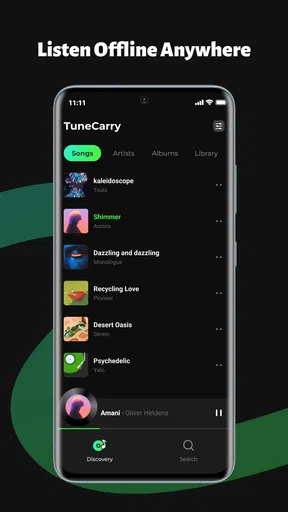
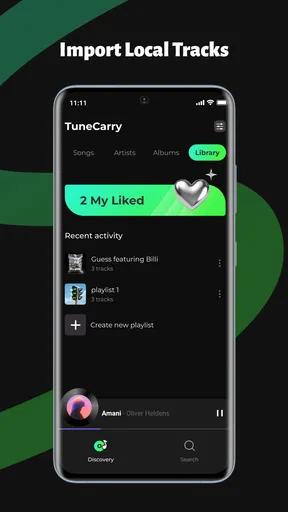
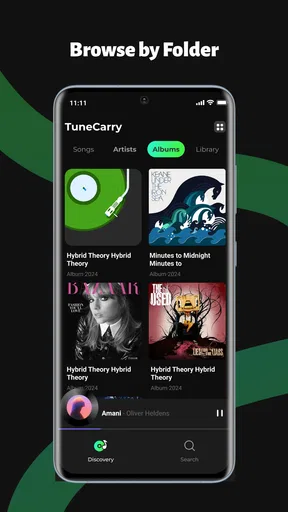
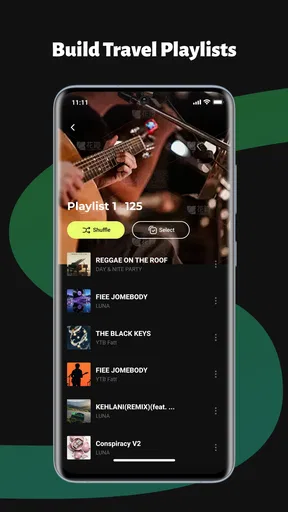
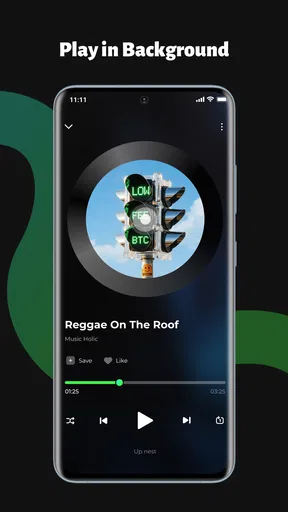
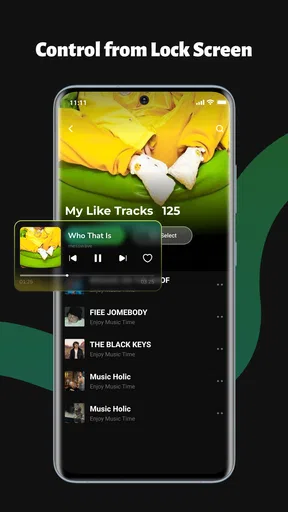
Our Review of TuneCarry: Offline Music
 Analysis by Appyee
I spent time with TuneCarry: Offline Music as a straightforward local music player, and its appeal became clear quickly: it is designed for people who already have songs on their device and want a cleaner way to listen without depending on a streaming catalog. That makes it a different kind of music app from Spotify, YouTube Music, or other services built around discovery and online libraries. Here, the starting point is your own collection.
The app sits in the Music & Audio category and is free to use. It comes from Photos & Videos Download Tools, a developer name that feels broader than the app’s actual purpose, but the player itself is focused on carrying personal tracks offline. In everyday use, I found the strongest reasons to consider it are playlists, folders, and lock-screen controls. Those details sound simple, yet they address the small frustrations that often make local playback feel less convenient than streaming.
My overall impression is positive for a specific audience rather than everyone. If you have downloaded music, transferred albums to your phone, or keep a carefully organized collection, this app can make that library easier to use. If you expect recommendations, synchronized streaming libraries, lyrics, podcasts, or a large built-in catalog, you will probably be happier with a more established streaming alternative.
How TuneCarry feels in its current state
The first thing I noticed is that the app does not try to turn local music into a social or discovery experience. Its job is much narrower: help you find and play the audio already stored on your device. That narrow focus is useful because it keeps the basic task understandable. You are not pushed toward subscriptions, trending songs, or an online account before you can listen.
Folders are particularly useful when your music is already arranged in a way that makes sense to you. Someone who keeps separate directories for albums, language lessons, live recordings, or personal mixes can use that existing structure instead of rebuilding everything inside a new service. I also like the practical difference between browsing by a traditional music library and browsing by storage location. A folder view can reveal exactly where a file lives, which is helpful when a song appears in an unexpected place or when a collection contains several versions of the same recording.
Playlists provide the more flexible layer. I would use them for situations that do not match the folder structure: a short commute mix, a set of tracks for concentration, or songs saved for a trip. The useful trade-off is that folders are usually better for permanent organization, while playlists are better for temporary listening plans. Keeping those roles separate prevents a carefully arranged music directory from becoming cluttered just because I wanted a one-day selection.
Lock-screen controls also matter more than they may seem. When I am walking, cooking, or driving as a passenger, I do not want to unlock the phone and search through an app just to pause or skip. A local player that behaves properly from the lock screen fits those moments better than a basic file browser with an audio button. It turns playback into something I can manage with less interruption.
The offline approach is the central benefit. Music stored locally is not affected by a weak signal, a crowded train, or a temporary service problem. It also avoids the uncertainty of whether a particular album will remain available in an online catalog. For travel, rural areas, or a phone used with limited connectivity, that reliability can be more valuable than recommendation features.
Who gets the most from a local-first player
I would recommend trying it if your listening habits are built around files you already own or have legitimately saved for offline use. It is a sensible match for people who move music between devices, keep recordings in folders, or want a player that does not make internet access part of every listening session. It can also suit listeners who prefer control over their collection instead of having an algorithm decide what appears next.
There is a useful fit for families and shared devices too. A local collection can contain children’s audio, language practice, audiobooks, and music without mixing those categories into a public streaming profile. The folder structure gives each kind of audio a visible place. I would still organize the files before importing or scanning them, because a messy storage layout will make any local player feel messy.
It is less suitable for someone who does not maintain local files. If nearly all your listening begins with searching for an artist, exploring new releases, or following curated stations, this app’s offline design may feel restrictive. The same is true if you switch between several phones and expect listening progress, playlists, and library changes to follow you automatically. A streaming service generally handles that broader ecosystem better.
A realistic daily routine
Imagine preparing for a flight. Before leaving home, I could place albums and spoken audio into clearly named folders, then build a playlist for the journey without relying on airport connectivity. During the flight, lock-screen controls would let me pause or skip without opening the phone fully. After landing, the same files would remain available without needing to download them again from a service.
That workflow also shows one of the app’s less obvious strengths: it separates preparation from playback. The important work happens when organizing the local collection, while the listening session itself stays simple. If I create a travel playlist in advance and keep the source folders intact, I can return to the original albums later without losing the context of the trip mix.
There is a second practical example for study. I could keep language lessons in one folder, instrumental tracks in another, and create a playlist that combines both for a particular routine. The folder view preserves the long-term archive, while the playlist handles the immediate schedule. That is more adaptable than forcing every use case into album-based browsing.
What the current release suggests about its direction
The app is currently on version 1.0.1, which places it at an early stage of its product life. I see that as both an advantage and a reason to keep expectations measured. The basic concept is already understandable, but an early release may still be refining how it handles different libraries, unusual file arrangements, and the small details that become important after weeks of use.
Its release date is June 30, 2026, so the product is still young in practical terms. I would judge it primarily by how well the current essentials work rather than expecting the depth of a long-established audio platform. The version number indicates a modest step beyond the initial release, but it does not justify assuming a large redesign or a long list of hidden additions. The sensible approach is to appreciate the foundation while watching how consistently it evolves.
The current fundamentals are the right ones for this type of app. Offline playback, playlist organization, folder access, and lock-screen controls form a useful core rather than a collection of distracting extras. A local player does not need to imitate a streaming platform to be valuable. In my view, its next improvements should deepen reliability and organization before adding features that make the interface busier.
For existing users, the move to version 1.0.1 should be understood as a current-state checkpoint rather than proof that the app has reached maturity. Anyone who already likes the local-first idea can continue building a library around it, but I would keep original files organized outside the app as well. That way, playlists and folders remain useful without becoming the only record of how the collection is arranged.
This matters because local music workflows are more dependent on the phone’s storage structure than streaming workflows are. If files are renamed, moved, or copied into several locations, the player may present a collection that feels duplicated or confusing. My practical advice is to choose one main music directory, use consistent album and artist naming, and create playlists only after the folders are stable. That small preparation step can make the app feel considerably more polished.
How it compares with familiar alternatives
Compared with Spotify or YouTube Music, this app gives up the enormous online catalog and gains independence from streaming access. Those services are better when I want to discover an unfamiliar artist, follow a release, or move between devices without thinking about file management. TuneCarry is better when the music I want is already on my phone and I want direct control over it.
Compared with a basic file manager, it offers a more appropriate listening workflow. A file manager can open an audio file, but it is not necessarily designed around continuous playback, playlists, or convenient lock-screen operation. The difference becomes obvious when I want to listen to a sequence of tracks rather than open one file at a time.
Compared with a feature-heavy local music player, the appeal here is simplicity. A more elaborate alternative may offer deeper tagging tools, visual themes, equalizer controls, or broader format support, depending on the product. Those extras can be valuable for enthusiasts, but they can also make ordinary playback harder to navigate. I would choose TuneCarry when I want the library and controls to stay close to the essentials.
The trade-off is that simplicity leaves less room for specialized workflows. A listener who carefully edits metadata, manages large classical collections, or expects advanced audio customization may outgrow it. In that situation, a dedicated enthusiast player is likely the better choice. TuneCarry makes more sense for practical local playback than for turning a phone into a highly technical audio workstation.
Small habits that improve the experience
My first tip is to use folders for permanent categories and playlists for changing moods or tasks. For example, keep albums in stable artist folders, then create playlists for exercise, travel, or evening listening. This avoids constantly moving files just to change what you hear today.
My second tip is to prepare offline sessions before you need them. If you are heading somewhere with unreliable connectivity, test the playlist at home and confirm that the intended tracks are available locally. The point of an offline player is confidence; discovering a missing file after leaving is exactly the kind of friction that good preparation prevents.
My third tip is to treat lock-screen controls as a safety and convenience feature, not merely a shortcut. Set up the desired playlist before starting an activity that makes phone handling inconvenient. During a walk or household task, being able to pause or skip without browsing through menus keeps the phone from becoming the focus of the activity.
A fourth useful habit is to avoid creating several copies of the same song in different folders unless you genuinely need them. Local libraries can become confusing when one track appears as a download, a backup, and an edited version. A clean storage structure makes folder browsing more trustworthy and keeps playlists easier to maintain.
Where the app still needs careful consideration
The biggest limitation is inherent in the local model: the app depends on you having audio files ready. It cannot replace the convenience of searching a massive catalog and pressing play. That is not a flaw in the concept, but it is a decisive difference. Before installing, ask whether your music life begins with files or with an online search box.
There is also a maintenance cost. Local collections need occasional organization, especially when tracks are copied from different sources with inconsistent names. The app can make playback easier, but it cannot remove the responsibility of keeping the underlying library understandable. Users who dislike sorting folders may find the initial setup more work than expected.
Early-stage software can also feel less predictable across unusual personal libraries than a mature platform. I would be especially attentive to how the app behaves with duplicated tracks, irregular folder names, and collections that mix music with other audio. These are the situations that reveal whether a simple player remains comfortable after the first few listening sessions.
The audience rating is Everyone, which makes the app broadly approachable, and it has passed the hundred-thousand-install mark with an average rating of 3.6 from 47 ratings. I would read that reception as encouraging but still limited evidence, because a relatively small review pool cannot describe every type of device or music collection. The free price makes testing easy, so I would try it with a small, representative folder before moving an entire library into the workflow.
For compatibility, the app requires Android 8.0 or later. That covers many active Android phones, but anyone using an older device should check the operating system before planning around it. The requirement is worth considering if you are trying to revive an older phone as a dedicated music player.
What I would watch as the product develops
I would watch for improvements that strengthen the relationship between folders, playlists, and the device’s stored files. Clear handling of moved tracks, duplicate entries, and reorganized directories would have a direct effect on long-term trust. For a local player, dependable library maintenance is more important than a flashy new front page.
I would also pay attention to how the app handles larger personal collections over time. The early experience can be pleasant with a small library, but serious users will judge it by how quickly they can find a specific recording after months of adding music. Search, sorting, and predictable grouping are the areas that determine whether a simple player remains useful or becomes another source of clutter.
Another meaningful direction would be refinement of everyday playback. Lock-screen controls already support the basic promise, so future progress should make starting a playlist, returning to a previous listening session, and switching between folders feel equally dependable. Those are unglamorous details, but they are what I notice after the novelty of a new app wears off.
I would not choose this app expecting a full streaming replacement. I would choose it as a focused tool for a local collection, especially when offline access and simple organization matter more than discovery. The free entry point lowers the risk, while the early version means I would keep my files well organized and evaluate it with my own library rather than relying only on first impressions.
After using it, my recommendation is fairly clear: TuneCarry: Offline Music is worth trying if your listening starts with music already stored on your Android device. Its folders, playlists, and lock-screen controls form a practical combination for travel, commuting, study, and personal archives. If your priority is an unlimited catalog, automatic recommendations, or effortless synchronization across devices, choose a streaming service instead. For everyone else, this is a focused local player with a sensible foundation and room to prove how well it grows.
Privacy and Permissions
See what permissions an app requests and how it handles your data.
- Photos/Media/Files
- read the contents of your USB storage
- Storage
- read the contents of your USB storage
- Wi-Fi connection information
- view Wi-Fi connections
- Other
- view network connections, full network access, run at startup, control vibration, prevent device from sleeping, Google Play license check
Verdict
Strengths of TuneCarry: Offline Music
- Works without mobile data once songs are saved locally.
- Simple interface makes offline playback quick to access.
- Useful for travel, flights, and areas with weak connectivity.
- Supports personal music organization through playlists and favorites.
- Offline listening can help reduce streaming data usage.
Limitations of TuneCarry: Offline Music
- Music availability depends on the app’s supported sources and formats.
- Downloaded tracks may use considerable storage space on the device.
- Some features may be limited behind ads or in-app purchases.
- No internet means newly added songs and metadata may not update.
- Battery usage can increase during extended offline playback sessions.
Similar Picks in This Category
View All
YouTube Music
Google LLC4.4

Samsung Music
Samsung Electronics Co., Ltd.3.8

Spotify: Music and Podcasts
Spotify AB4.3

JioSaavn - Music & Podcasts
Saavn Media Limited4.3

Lark Player:Music Player & MP3
Lark Player Studio - Music, MP3 & Video Player4.6

StarMaker: Sing Karaoke Songs
SKYWORK AI PTE. LTD.4.3
Frequently Asked Questions
What is TuneCarry: Offline Music, and what does it offer?
TuneCarry: Offline Music is designed for listening to music without relying on a continuous internet connection. After adding or downloading compatible audio files, users can organize tracks into a personal library, create playlists, and play songs offline. It is particularly useful for travel, commuting, or areas with weak reception, although available features may depend on the device, app version, and music source.
Can I listen to music offline after downloading TuneCarry?
Yes, the main purpose of TuneCarry: Offline Music is offline playback, but installing the app alone does not automatically provide a catalog of songs. You generally need to add supported audio files or download music through an available, legitimate source before going offline. It is best to test playback while connected to the internet and confirm that your selected tracks are stored locally.
Does TuneCarry: Offline Music include free songs or require a subscription?
The app’s pricing and included features can vary depending on the platform, region, and current version. TuneCarry may offer basic music playback without a subscription, while optional purchases or premium features could be available. Before downloading or importing music, check the official store listing for advertising, in-app purchases, subscription terms, and any limitations affecting offline listening.
What audio files and devices are supported by TuneCarry?
TuneCarry: Offline Music is intended to work with commonly supported audio formats, but exact compatibility can differ between Android and iOS. Some files may fail to appear or play correctly because of unsupported codecs, digital rights restrictions, storage permissions, or operating-system limitations. Users should review the app’s current requirements and ensure they have enough free storage for their music library.
Is TuneCarry: Offline Music safe and legal to use?
The app should be downloaded from a trusted source, such as Google Play or the Apple App Store, to reduce the risk of modified or unsafe versions. TuneCarry itself is only a playback and library tool; users remain responsible for obtaining music legally and respecting copyright. During setup, review requested permissions and avoid importing files from unknown or suspicious sources.
